
How to Charge 30 Student Devices at the Same Time
Teachers, does this sound familiar?
First period starts in ten minutes. Your students are filing in, and half the Chromebooks sitting in the cart are at 12%.
This (and other problems) is common in many K-12 institutions. It eats into instructional time before the day even begins.
When schools manage dozens of devices per classroom, charging stops being a background task and starts being an operational bottleneck.
Here’s a closer look at what’s actually going wrong and what better charging infrastructure looks like for your K-12 environment.
Inconsistent Charging Across Device Brands
There’s a good chance your school doesn’t run a single device brand across every classroom. Your district might have Chromebooks in elementary grades, iPads in a media center, and Windows laptops in a computer lab.
Sadly, older charging infrastructure wasn’t built for that mix.
Legacy USB-A carts require separate adapters per device type, which means:
- More cables to track
- More compatibility issues to troubleshoot
- More opportunities for the wrong charger to end up with the wrong device
USB-C has changed this significantly. For this reason, it’s now the standard port across Apple, Google, Dell, HP, and Lenovo devices.
When you deal with an assortment of devices, a charging cart with USB-C handles a mixed fleet without adapter management. Such a charging solution simplifies both daily operations and procurement decisions when your device inventory changes.
The Outlet Problem Nobody Plans For
Most classrooms were designed before one-to-one device programs existed. A typical room might have six to eight wall outlets, most of them already occupied by projectors, teacher workstations, and other fixed equipment.
When 30 student devices need power simultaneously, there’s nowhere to put them.
As a result, staff improvise with power strips and extension cords. Those solutions work until they don’t. In many cases, tripped breakers, maxed circuits, and frayed cables are common results.
When your staff and faculty scramble to find charging space, time that should be spent on instruction is wasted. Worse yet, the sheer volume of devices puts real strain on electrical infrastructure that wasn’t built for the load.
Charging Delays Before Class
Even when outlets are available, simultaneous charging across 30 devices creates a queue. Standard wall chargers and older USB-A systems throttle power delivery when too many devices draw from the same circuit. The result is a cart full of devices that are partially charged by morning but not ready for a full day of use.
When this happens, teachers end up rationing devices, pulling the most-charged ones first and rotating the rest. That creates an inconsistent experience for students and puts the burden of device management on educators who have other priorities when the bell rings.
Cable Clutter and Safety Hazards
When charging happens ad hoc at desks, on floors, or near doorways, cables accumulate fast. In a room with 25 to 30 students moving around, loose power cords become trip hazards. This risk compounds in classrooms with younger students or in schools where devices migrate between rooms throughout the day.
Beyond physical safety, inconsistent cable management accelerates wear on device ports.
Cables that bend at odd angles, get stepped on, or go missing regularly drive up replacement costs that most technology budgets don’t account for.
Power Management Across Multiple Classrooms
The charging problem scales with your device program. While a single classroom is manageable, problems compound across a full grade level or an entire building.
Inconsistent charging infrastructure creates a coordination problem for IT staff. There’s no visibility into which devices are charged, which need attention, and where they are at any given time.
Without centralized charging, your team spends reactive time tracking down dead devices instead of proactively managing your fleet. That reactive posture increases downtime and makes it harder to catch hardware issues before they become classroom disruptions.
Heat Buildup During Simultaneous Charging
Thirty lithium-ion batteries charging at once generate heat. In a closed cart or a tight storage space without proper airflow, that heat accumulates. Sustained heat exposure degrades battery health over time, which shortens device lifespan and increases replacement frequency.
Battery-related issues won’t show up immediately as they compound quietly. Devices charged in poor thermal conditions lose capacity gradually, so the degradation isn’t obvious until devices stop holding a charge through a full school day.
By then, the damage is done.
Charging Solutions for Your K-12 Environment
The right charging infrastructure removes these problems from your daily operations. For K-12 environments managing 20 or more devices per classroom, here are the solutions that address the issues above.
USB-C Charging Carts for Education
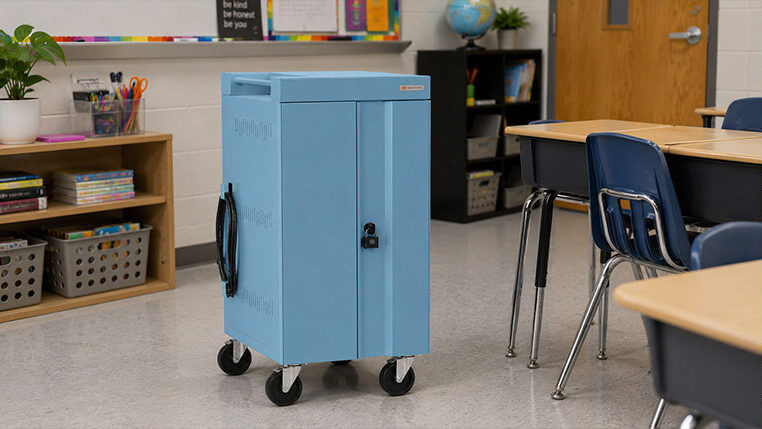
Carts like the CUBE Cart® Slim Proc Plus consolidate device charging into a single, managed unit. Pre-wired USB-C cables eliminate the adapter problem, and smart power distribution means every device gets adequate power simultaneously. The Slim Pro holds 30 to 42 devices in a compact footprint with built-in ventilation to manage heat during overnight charging.
Charging Lockers
For schools with shared device programs or bring-your-own-device environments, lockers add accountability to the charging process. Students check devices in and out, and the locker tracks usage in real time through Bretford Connect.
Charging Towers
A space-efficient option for classrooms or common areas where floor space is limited. Towers charge multiple devices vertically without requiring a full cart footprint, making them a practical fit for libraries, media centers, and smaller rooms.
Charging Stations and Smart Hubs
Countertop stations work well for teacher devices, reception areas, or smaller device sets that don’t justify a full cart. Smart hubs add provisioning capability, useful for schools that need to push updates or configurations to multiple devices at once.
What Fully Charged Devices Actually Give You Back
The 10 minutes you lose to dead batteries every morning adds up to hours of instructional time over a school year. It also adds up to IT tickets, cable replacements, and device repairs that compound quietly in the background.
A charging cart with USB-C is a worthwhile investment for your environment. For any school running a serious device program, it’s the infrastructure that makes the program work as intended.
If you’re managing a classroom fleet and want to see what the right fit looks like for your environment, request a free quote on USB-C charging carts for education from Bretford.
